<?xml version="1.0" encoding="utf-8"?><rss version="2.0">
<channel>
<title>eCoustics.com receiver articles</title>
<link>http://www.ecoustics.com/latest/articles</link>
<description>Latest articles, updated every five minutes</description>
<item>
<title>What &quot;0 dB&quot; Volume Means on AV Receivers</title>
<link>http://forum.ecoustics.com/bbs/messages/34579/498440.html</link>
<description>
</description>
<pubDate>Tue, 24 Jun 2008 19:36:00 -0400</pubDate>
</item>
<item>
<title>Surround Sound A/V Receiver Buying Guide</title>
<link>http://forum.ecoustics.com/bbs/messages/34579/478615.html</link>
<description>
</description>
<pubDate>Tue, 29 Apr 2008 20:15:00 -0400</pubDate>
</item>
<item>
<title>JVC KWAV810 In Dash Navigation System Review</title>
<link>http://www.ecoustics.com/tl/22059/</link>
<description>
It is becoming more and more popular for the aftermarket in-dash units to meet all of our needs. We often dream about having a car receiver that can just do everything. Something we could simply hook up and have it all. JVC has been one of the leaders in making this dream a reality. Now we can have it all. The new JVC KW-AVX810 is to some, a dream machine. Here is why some would consider it that. Let&amp;rsquo;s start with the outside. The JVC in dash navigation system (KW-AVX810) looks good and it doesn&amp;rsquo;t matter whether it is on or off. The 7&amp;rdquo; LCD touchscreen display can add a refined look to any car. Turn it on and the brilliant colors will surprise you. The touch screen itself is motorized and will move up and down. When the screen is down, the user will have access to the CD/DVD slot. The really unique feature about this unit is the detachable face. This is one of the few 7&amp;rdquo; double DIN receivers that offer a detachable faceplate, which is a security feature that some people specifically look for. Good job JVC. The KW-AVX810 also features a proximity sensor that will...</description>
<pubDate>Thu, 24 Apr 2008 15:30:03 -0400</pubDate>
</item>
<item>
<title>Will the iPhone Be Fair Game?</title>
<link>http://www.ecoustics.com/tl/20398/</link>
<description>
The iPhone, up until now, hasn&amp;rsquo;t met a lot of customer expectations. Want to send a &amp;ldquo;Happy New Year!&amp;rdquo; message to all your friends? You can&amp;hellip; one at a time. Want to have live Google maps as you drive without having to look at street signs every second? You can&amp;rsquo;t. But this, my friends, may be about to change - according to various sources on the Internet, including GearLive . The last firmware update to grace the iPhone included very minute additions (iTunes WiFi), and was mostly put in place to resolve some of the bugs. However, with the release of iPhone firmware 1.1.3, the iPhone could be that much closer to being real competition. The new update may include the things that Apple truly forgot on release. A list, perhaps, will explain it better: Google Maps Hybrid Mode Drag and Drop Applications on Home Screen Bookmark Shortcuts on Home Screen Home Screen Support of Pagination Multiple Receivers via SMS Messages Google Maps Pin-Point Application Using Cell Tower Triangulation Sure, Apple is still missing things: for example, a louder ring/vibration, flash-supported Safari, and 3 rd party apps - but it's certainly getting there. This update will hopefully bring us that...</description>
<pubDate>Sat, 12 Jan 2008 00:48:12 -0500</pubDate>
</item>
<item>
<title>Photos That Know Where They Were Taken</title>
<link>http://www.ecoustics.com/pcw/howto/132760</link>
<description>
Here's how to use geotagging to add location data to your image files.</description>
<pubDate>Tue, 26 Jun 2007 04:00:00 -0400</pubDate>
</item>
<item>
<title>Xbox 360 Elite: Thinking Inside the Box</title>
<link>http://www.ecoustics.com/dt/talk/178</link>
<description>
The advantage to being first to market is you have the market to yourself for awhile; the disadvantage is your product looks old first and people stop buying it. Xbox 360 sales have been slowing though they still seemed to be outselling the PS3 which is rumored to be getting a price cut shortly to boost sales.The DealSo far the response to this new product has been a bit tepid, the core advantages over the Xbox 360 are HDMI out (which is important if you have a current generation High definition TV or an HDMI switching receiver), a larger hard drive for downloading movies and sh...</description>
<pubDate>Wed, 28 Mar 2007 02:00:00 -0400</pubDate>
</item>
<item>
<title>Tech Predictions for 2007</title>
<link>http://www.ecoustics.com/dt/talk/163</link>
<description>
Having written about video and audio technology since&amp;mdash;gulp!&amp;mdash;1980, let me tell you, there have been some mighty dull years. When I started out, big-screen TVs existed, but were based on analog technology and looked awful. The notion of combining video and audio into a single system was so unusual then that I was actually rebuked by my bosses at Video Magazine for writing a long and prominent new-product item about the very first surround receiver. It was a Kenwood with composite video switching, and no surround decoding, because surround sound hadn&amp;rsquo;t reached the home front.&amp;nbsp;&amp;nbsp;&amp;nbsp;&amp;nbsp;&amp;nbsp;&amp;nbsp;&amp;nbsp;&amp;nbsp;&amp;nbsp;&amp;nbsp;&amp;nbsp;HDTV and the progeny of ...</description>
<pubDate>Wed, 10 Jan 2007 03:00:00 -0500</pubDate>
</item>
<item>
<title>Using Your Receiver's Second Zone For Music Listening</title>
<link>http://forum.ecoustics.com/bbs/messages/34579/306797.html</link>
<description>
</description>
<pubDate>Tue, 26 Dec 2006 18:11:00 -0500</pubDate>
</item>
<item>
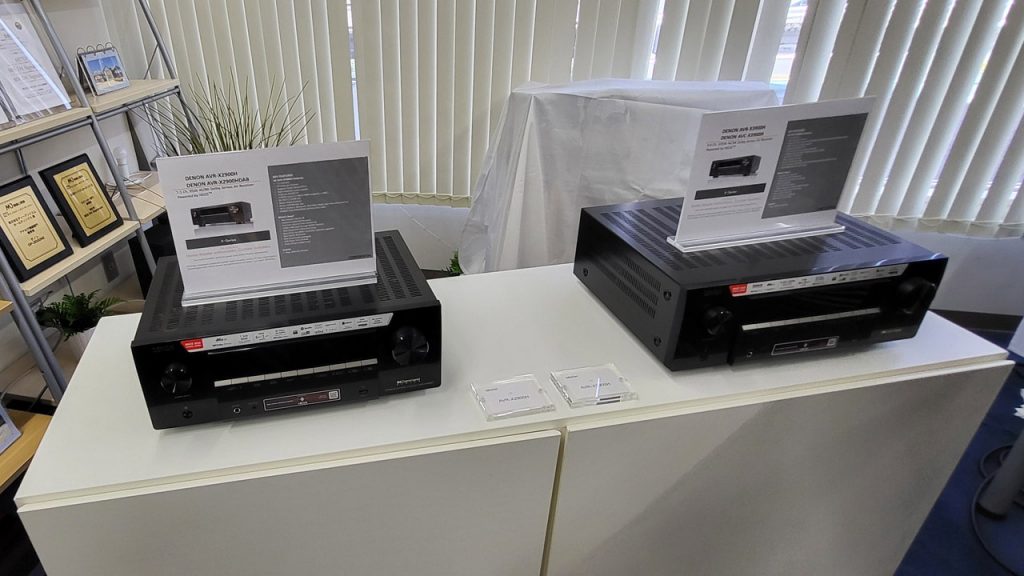
<title>CEDIA 2006 Photos: Denon Receivers</title>
<link>http://forum.ecoustics.com/bbs/messages/34579/270615.html</link>
<description>
</description>
<pubDate>Tue, 19 Sep 2006 05:58:00 -0400</pubDate>
</item>
<item>
<title>CEDIA 2006 Photos: Sherwood Receivers</title>
<link>http://forum.ecoustics.com/bbs/messages/34579/270606.html</link>
<description>
</description>
<pubDate>Tue, 19 Sep 2006 05:51:00 -0400</pubDate>
</item>
<item>
<title>Why HDMI is the Clear Choice for HDTV Connectivity</title>
<link>http://www.ecoustics.com/tl/14102/</link>
<description>
Let's face it. The transition to HDTV has been a painful and confusing one.  It's bad enough that there are now 10 different types of TV technologies available in the market, but what's worse is that display makers, content providers, set-top box manufacturers, and the entire PC industry has been pushing several completely different ways of connecting high definition components since the launch of the first HDTV products in 1998. What's the end result? There are now millions of high definition products in the market, and they all have different plugs on the back.</description>
<pubDate>Wed, 03 May 2006 15:17:09 -0400</pubDate>
</item>
<item>
<title>A Petite but Finicky Windows Mobile Handheld</title>
<link>http://www.ecoustics.com/pcw/howto/125101</link>
<description>
The Pharos Traveler GPS 525 packs GPS and Wi-Fi into a tiny package, but usability and performance sometimes disappoint.</description>
<pubDate>Fri, 17 Mar 2006 03:00:00 -0500</pubDate>
</item>
<item>
<title>PDA Pundit: Lots of News in Handheld Land</title>
<link>http://www.ecoustics.com/pcw/howto/123036</link>
<description>
A new HP IPaq, new services, and new Palm PDAs: It's been a busy few weeks.</description>
<pubDate>Tue, 18 Oct 2005 03:00:00 -0400</pubDate>
</item>
<item>
<title>How to Connect Audio from a DVD Player to a Stereo Receiver</title>
<link>http://www.ecoustics.com/tl/11705/</link>
<description>
Remember the days when connecting your turntable, 8-track, and tape player all used the same two cables? For years connecting audio to a receiver was a snap because there was only one way to do it. Those days are gone.  Digital technologies have...</description>
<pubDate>Fri, 29 Jul 2005 16:10:11 -0400</pubDate>
</item>
<item>
<title>Selecting the Right Audio Format for DVD Playback</title>
<link>http://www.ecoustics.com/tl/11676/</link>
<description>
There are many who've spent thousands on a killer digital surround sound system to achieve the ultimate cinematic experience in the comfort of their living room. Yet, one of the most important steps to getting the best sound quality possible is so often overlooked...</description>
<pubDate>Tue, 26 Jul 2005 17:52:38 -0400</pubDate>
</item>
<item>
<title>Receiver and Subwoofer Crossover Setup</title>
<link>http://forum.ecoustics.com/bbs/messages/34579/109297.html</link>
<description>
</description>
<pubDate>Mon, 11 Jul 2005 22:43:00 -0400</pubDate>
</item>
<item>
<title>Ask The Experts: Receiver not Decoding Multichannel Audio</title>
<link>http://www.ecoustics.com/tl/11364/</link>
<description>
Question:I was given a Sony STR-DA30ES receiver. There is a light that is supposed to light up when the unit is decoding a multichannel signal. I have the dvd player hooked to the the receiver through RCA cords (red ,white ,yellow). Do I need to use the coaxial from the DVD audio out to the receiver to get it work?-submitted by zipAnswer:When connecting a receiver capable of decoding Dolby Digital and/or DTS digital sound, the receiver needs to be connected to a digital audio output on the DVD player. The red/white analog connection is not a digital output. The best audio you would get from this connection would be Dolby Pro Logic surround.DVD players typically support 2 kinds of digital outputs. One is coaxial, which is usually an orange RCA connector. The other is known as optical, which is a squarish-black TOSLINK connector. Your DVD player may only sport one or the other. Either you choose will be able to get the digital audio stream to the receiver. Some DVD players have specific settings in the player's setup menu for digital audio. Make sure that you check to see if your DVD player is properly configured.Your receiver may also need ...</description>
<pubDate>Tue, 14 Jun 2005 12:14:04 -0400</pubDate>
</item>
<item>
<title>Why I returned my Sony RM-AV3100 universal remote...</title>
<link>http://www.ecoustics.com/tl/11363/</link>
<description>
Got the new TV. Love it. Got the new DirecTV receiver. Pretty much have it working the way I want it to.Got the Sony RM-AV3100 &quot;Integrated Remote Commander&quot;. Not sure I'm keeping it.Here's what I'm thinking...It's universalIt's got codes for everything I needed. No big feat, though, given that most of my components are also Sony. And it's a learning remote, so it would have been fine anyway (just a lot more work). As it stands, a half-dozen buttons or so for each of my non-Sony components, and they became totally submissive -- with all the right buttons on the remote doing all the right things. Beautiful.It impressed me by impersonating my TiVo remoteExtension of it's universality (is that a word?), I guess, but this impressed me enought o deserve note... Plugged in the (only option for a) code for my Philips TiVo, and it immediately got the picture. I was able to do just about everything I'd ever want to do with my TiVo remote. I guess I'm easily impressed, but I expected it to be harder than it was.It's got macrosI can record them. They work. But I can't associate them with any of the primary (real) keys ...</description>
<pubDate>Tue, 14 Jun 2005 00:12:36 -0400</pubDate>
</item>
<item>
<title>Configuring Your Receiver for a Passive Subwoofer</title>
<link>http://www.ecoustics.com/tl/11131/</link>
<description>
Setting up an audio system is a lot trickier today than it was many years ago. In the past, speakers were designed to reproduce bass frequencies, so the need for subwoofers were non-existant. When the size of speakers began shrinking, the need for subwoofers to handle bass increased.In learning The 'Bassics' of Bass Management, you'll discover that receivers figure out what speakers should get bass digitally, and send the appropriate bass information to a powered subwoofer using a line-level connection. But before receivers were digital, bass management had to be handled by the subwoofer using a age-old technology. Subwoofers have undergone some serious change in the past decade. Intitially, most subwoofers were passive. A passive subwoofer does not have its own amplifier built in, and is therefore connected with speaker wire between the front or all speakers. What makes it more confusing is that even newer powered subwoofers can be connected passively, which means that it is still connected in the same manner as a passive sub. This method of subwoofer hook-up is very common for those that use Bose speaker systems, or anyone with a passive subwoofer. In the ReceiverThe receiver's &quot;yes&quot; or &quot;no&quot; setting for the subwoofer ...</description>
<pubDate>Sat, 07 May 2005 13:05:28 -0400</pubDate>
</item>
<item>
<title>The 'Bassics' of Bass Management</title>
<link>http://www.ecoustics.com/tl/11125/</link>
<description>
Ever wondered what that small or large setting on your home theater receiver actually does? Read on to learn about bass management, and how to set it up right to give you the best sound.</description>
<pubDate>Fri, 06 May 2005 14:32:45 -0400</pubDate>
</item>
<item>
<title>Set Your Speakers to &quot;Small&quot; in Your Receiver Setup</title>
<link>http://forum.ecoustics.com/bbs/messages/34579/128214.html</link>
<description>
</description>
<pubDate>Wed, 30 Mar 2005 09:16:00 -0500</pubDate>
</item>
<item>
<title>Ask The Experts: Why Does My Receiver Say 'Protect'</title>
<link>http://www.ecoustics.com/tl/10674/</link>
<description>
Question: Why does my new audio system for my tv say &quot;protect&quot; and then shut its self off? -submitted by mtnman Answer: Receivers can go into a protect mode for a few reasons.  The most likely is that the positive and negative wires on one of the speaker lines are touching. This causes a short, and the receiver will turn off to protect the amplifier from blowing up. This commonly happens when your receiver or speakers uses five-way binding posts like those shown in the image. Verify that the positive and negative wires aren't touching at the back of the receiver and all speakers.  It is possible that one of the speakers is blown. Try disconnecting one at a time until the receiver no longer turns off. If one speaker is the problem, it is either blown or there is a problem with the wire connecting it. Ifyou have more than one pair of speakers connected to a single output at the same time, this can often cause a receiver to go into protect. If this is the case, do not connect both pairs to the same output. In the worst case, the receiver will shut down even ...</description>
<pubDate>Tue, 22 Feb 2005 15:15:06 -0500</pubDate>
</item>
<item>
<title>Ask The Experts: Intermittent Sound on 5.1 DVDs</title>
<link>http://www.ecoustics.com/tl/10399/</link>
<description>
Question:I resently upgraded from pro logic reciever to a digital one. My problem is when in digital mode 5.1 or dts there are skips in sound track every few minutes for maybe a second. I own a fisher dvd player that is probly 4 or 5 years old. I am using a optical input into a marrantz 4400 reciever. Would upgrading to a new progressive scan dvd plyer stop this from happening. or is it the way I have it set up?ThanksCharles-submitted by agincajinAnswer:The progressive scan feature deals with how the DVD player sends the DVD image to a digital television, and would not affect the sound in any way. Unless the optical output on your existing player is defective, upgrading to a new player will not solve this problem.In order to troubleshoot the problem, there are some experiments you'll need to perform in order to narrow down the issue.Plug the optical cable into a different optical input on the receiver. If the problem persists, the cable is not the problem. If it works, one of the optical inputs on the receiver is not functioning properly.Try a different optical cable. It's possible the one you're using is defective. If it ...</description>
<pubDate>Fri, 31 Dec 2004 11:42:09 -0500</pubDate>
</item>
<item>
<title>Ask The Experts: Send Audio &amp;Video Signals Across the Room Without Wires</title>
<link>http://www.ecoustics.com/tl/10362/</link>
<description>
Question: Hi, We have a great 36&quot; Panasonic HDTV on one side of our family room and a great Onkyo receiver on the other side. We want to play the audio of our TV through the stereo. How can I connect the 2 without tearing up our wall to install new wires?  We tried a US Robotics Soundlink, but there is a great amount of background static in the audio. Do you have another suggestion?  Thanks, Dave Hirsch PS. GREAT WEBSITE!!! Answer: As many have learned, getting audio or video across a room or across the the house can be challenging. Not only can it be difficult to run wires, but it can be difficult to do it wirelessly as well. Let's face it, the only great way to get audio or video signals from one place to another with perfect integrity is to use hard-wired connections. However, running wires isn't always practical either.  Trying the Soundlink was a great idea. It boasts a range of 1000 feet! That's impressive for a little box, but results are often different from claims. Here's the three most possible reasons why the signal was full of static:  The Soundlink ...</description>
<pubDate>Mon, 20 Dec 2004 23:26:16 -0500</pubDate>
</item>
<item>
<title>Understanding Amplifier &amp;Receiver Power Specifications</title>
<link>http://www.ecoustics.com/tl/10309/</link>
<description>
It's no secret that it takes a lot of knowledge to truly understand the world of home audio, which is littered with confusing numbers and terms. Wattage, current, distortion, frequencies, and impedance are just a few of the specifications anyone looking for an amplifier of home theater receiver is going to come across. With the thousands of choices in each category, it takes a little bit of background to use these specifications to make a great choice.  In steps the watt... Evaluating and stating the wattage of an amplifier has become the single most important number to the amplifier shopper. Unfortunately, wattage is a highly misunderstood specification, which dupes people into buying products with a level of performance much lower than what is anticipated. 100 watts seems to be the magic number for most, thinking that as long as you have 100 of them, and no less, they'll be fine. However, even passenger side www on your car states that things aren't always as they appear. To be fair, wattage is an important number that can give a clear understanding of an amplifiers performance. A Watt, named after the British scientist James Watt, is a unit of power. And ...</description>
<pubDate>Tue, 14 Dec 2004 10:13:18 -0500</pubDate>
</item>
</channel>
</rss>