How-to Enable 30-second Skip on a Motorola DCT6412 Comcast DVR
(should also work on other cable systems that use this set-top box)
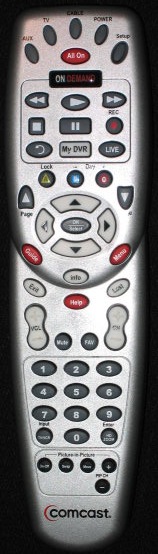
Instructions:
- Press the “Cable” button at the top of the remote to put it into Cable Box control mode
- Press and hold the “Setup” button until the “Cable” button blinks twice
- Enter the code 994 from the keypad (the “Cable” button should blink twice)
- Press (do not hold) the “Setup” button
- Enter the code 00173 (for 30 second Skip)
- Press any button you want to map the skip (e.g. the “A” Lock button)
- If successful, the “Cable” button will blink twice
To restore the button:
- Press the “Cable” button at the top of the remote
- Press and hold the “Setup” button until the selected device button blinks twice
- Enter the code 994 (the “Cable” button should blink twice)
- Press the button you are restoring twice
- If successful, the “Cable” button will blink twice