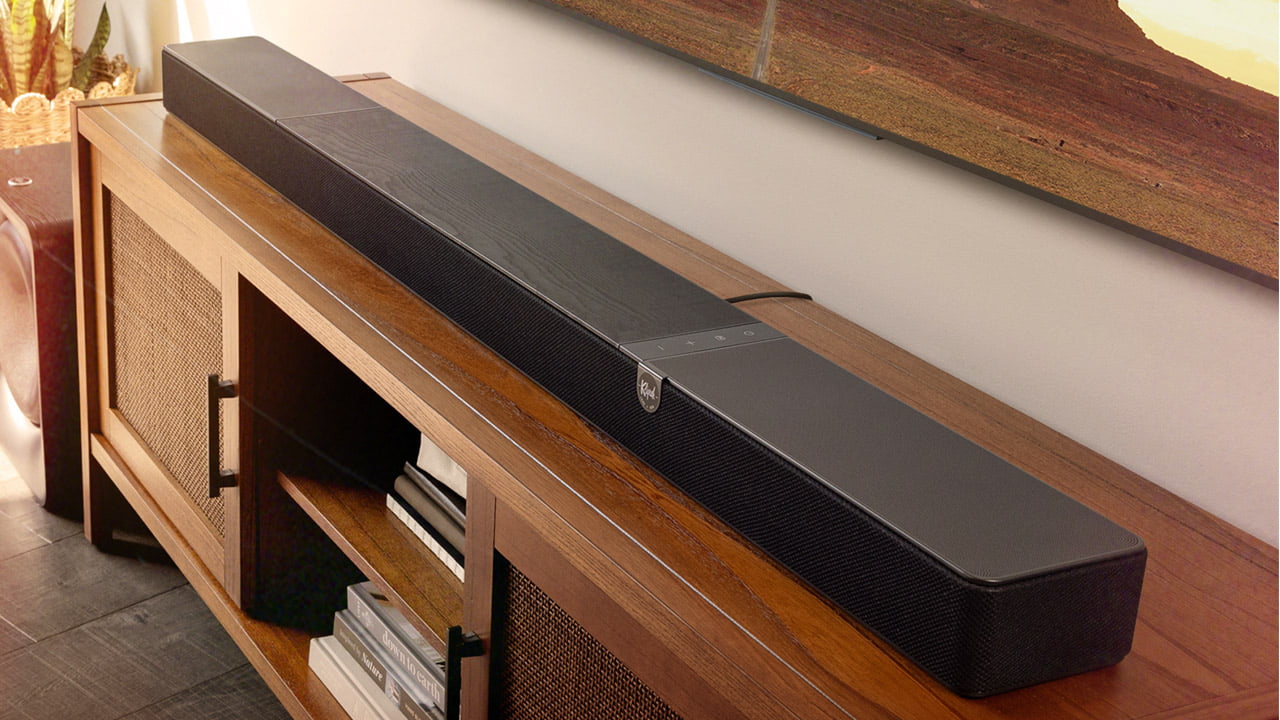
Nearly 30 years after Altec Lansing introduced the first multi-channel digital soundbar, Klipsch has just introduced another first: the first soundbar with integrated DIRAC Live room correction. Unveiled at CEDIA Expo 2024, the Klipsch Flexus Core 300 soundbar took a little longer than expected to hit the market, but it’s here now and we’re excited to put it through its paces.

What Is It?
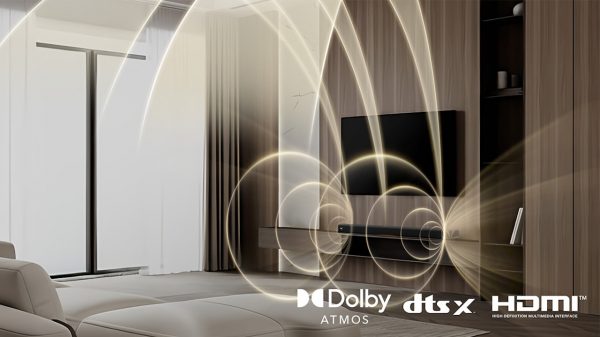
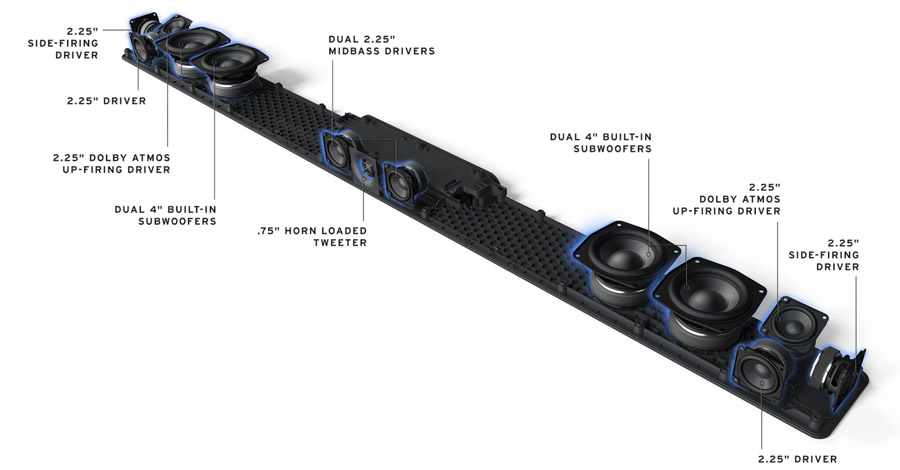
The Klipsch Flexus Core 300 ($1,199.99) is the latest soundbar in the Klipsch Flexus line. The bar is described as “5.1.2-channel” as it uses both up-firing and side-firing reflective drivers to extend the soundstage above and around the listener. Amplifiers designed by sister company Onkyo are built-in, so you won’t need to add an A/V receiver or amplifier. The Flexus Core 300 supports both Dolby Atmos and DTS:X immersive surround as well as legacy audio formats like PCM, Dolby Digital and DTS surround. The company claims a frequency response of 43Hz–20kHz, though listening suggests that this is a bit optimistic, at least on the low frequency end.
The Flexus Core 300 bar features 285 total Watts of clean Onkyo power, driving 13 speakers. This includes four front-firing, two side-firing and two up-firing drivers as well as four integrated woofers for low frequency reproduction. The 13th driver is a dedicated ¾-inch horn loaded tweeter for the center channel.
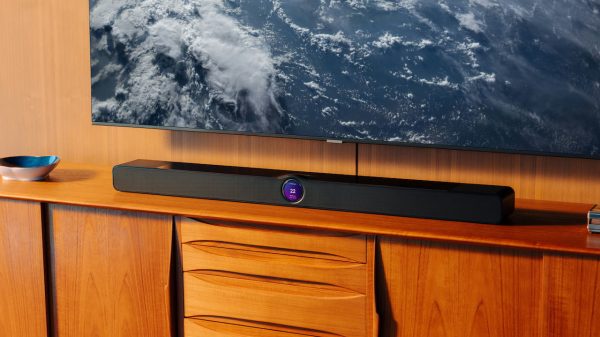
At 54 inches wide, 3 inches tall and almost 5 inches deep, it’s one of the larger bars we have tested. It makes a great visual match for a 65 inch or 75 inch TV, though its depth will make wall-mounting a challenge. If you’re placing it on a credenza or console, be sure your TV’s stand or feet give you enough clearance so the bar doesn’t block the TV screen or IR sensor.
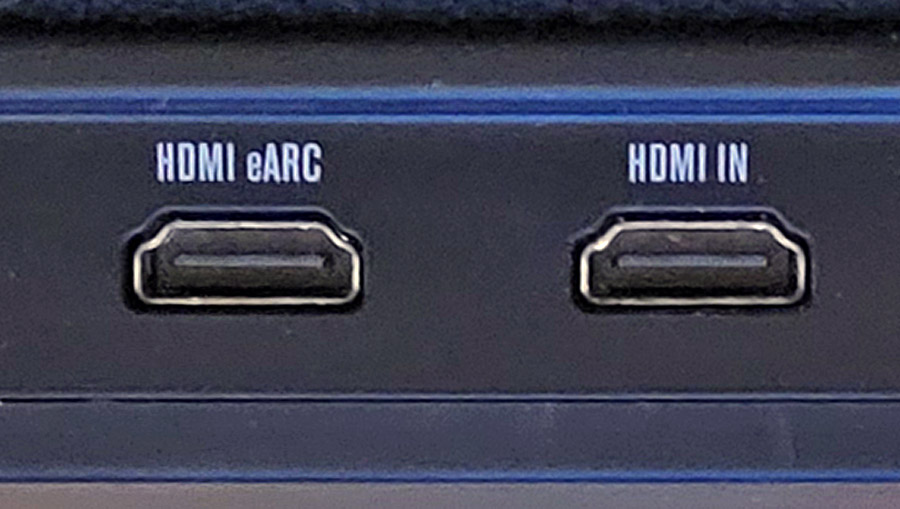
The bar includes an HDMI port with ARC/eARC for connection to a TV as well as a second HDMI port for direct source connection. This second HDMI port is particularly handy if you are using the bar with an older TV or projector without ARC/eARC support or one that is limited in its ability to pass through all audio formats.
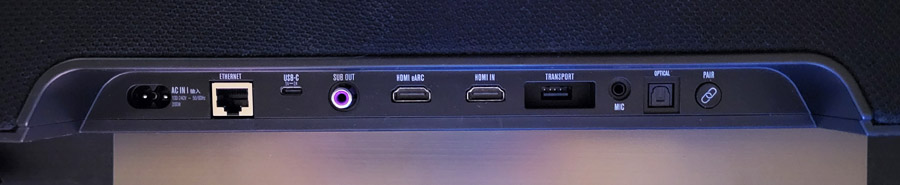
The Flexus Core 300 also includes a fiberoptic digital audio input, an RCA output for a wired subwoofer, a USB-C port for digital music playback and firmware updates, an Ethernet jack for hard-wired network connection, as well as a mic input for the calibration microphone. The USB port marked “Transport” is for connection of a wireless transmitter dongle which enables optional rear speakers and up to two wireless subwoofers. The bar also includes Bluetooth and WiFi wireless connectivity with support for Apple AirPlay 2, Google Cast, Spotify Connect and TIDAL Connect.
Like most high-end soundbars, the Flexus Core 300 supports the addition of wireless rear channel speakers and a subwoofer. Actually the Core 300 can support up to two wireless subwoofers for enhanced immersion and low bass reproduction. And unlike most bars, the unit also includes a standard RCA subwoofer output so you can use it with virtually any third party powered subwoofer. In fact, you could connect two wireless subwoofers and a wired one for a prodigious amount of bass, even in a large room.
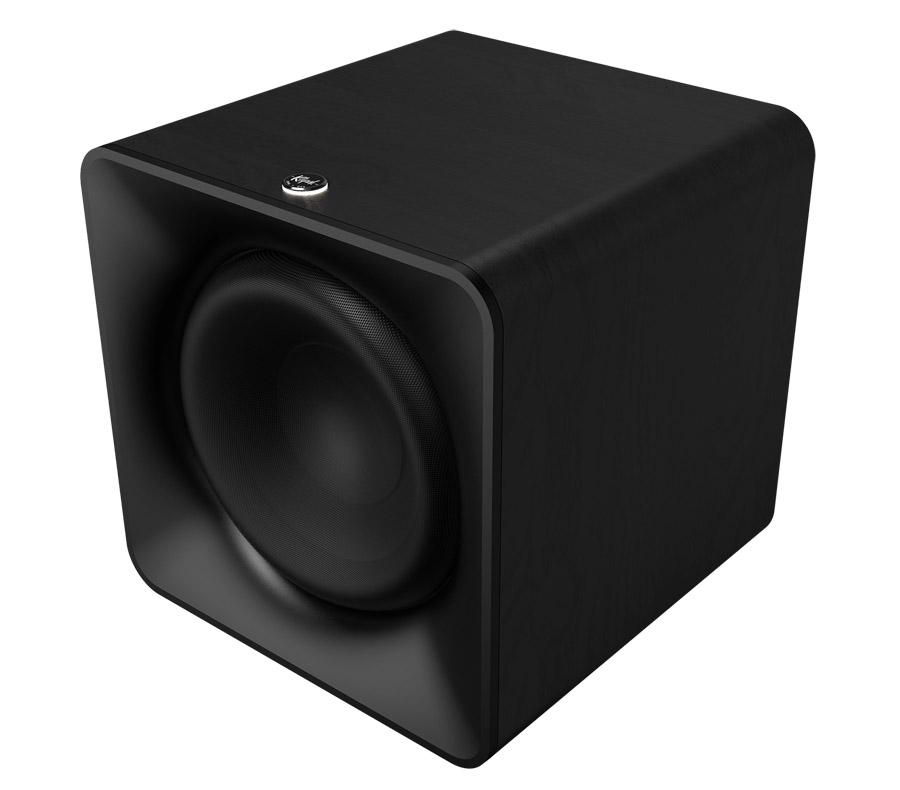
We tested the bar on its own and with the Klipsch Flexus SURR 200 rear speakers ($499/pair) and Flexus SUB 200 subwoofer ($599) for a total system price of around $2,300. A smaller SURR 100 speaker is also available which omits the up-firing driver. A smaller wireless subwoofer (SUB 100) is also available for use in smaller spaces.
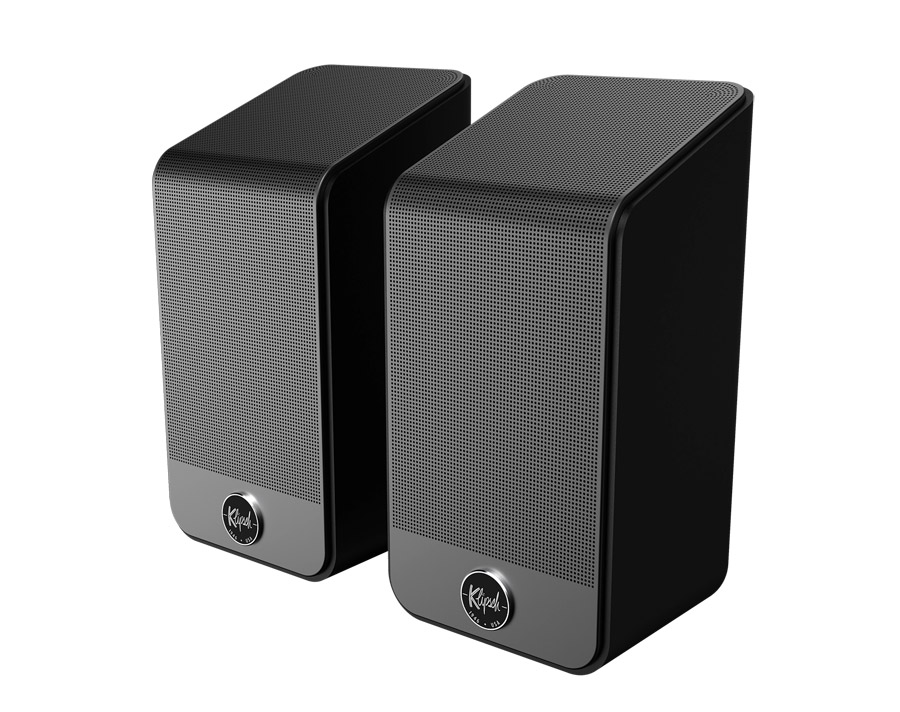
The SURR 200 speakers include both front-firing and up-firing drivers, expanding the bar from 5.1.2-channels to 7.1.4 channels. They include a threaded stand mount, but no keyhole mount so you’ll need a stand or bookshelf for them (be sure not to block the upfiring driver for height sounds).
All That with a Side of DIRAC
What sets the Flexus Core 300 apart from any other soundbar-based system is support for DIRAC Live room correction. As soundbars and speaker systems expand to more and more channels, the speakers interact not only with their environment (walls, furniture and ceiling) but also with each other. DIRAC Live room correction identifies and corrects for room frequency anomalies by applying digital filters, adjusting phase, EQ and levels of each speaker. This allows the system to work more coherently as a whole, with all drivers helping to compensate for idiosyncrasies in the listening room.
The DIRAC version included with the Flexus Core 300 is the limited bandwidth version, though the full bandwidth version is available from DIRAC for a nominal upgrade fee (Currently $99).
Features and Functionality
In addition to DIRAC Live, the Flexus Core 300 has plenty to offer from a features standpoint. It decodes the two most popular immersive surround sound formats – Dolby Atmos and DTS:X – as well as other legacy versions of Dolby and DTS surround and PCM. It doesn’t support more obscure immersive formats like AURO-3D, Sony 360RA, MPEG-H or Eclipsa Audio, but few soundbars do. The Flexus 300 offers Night Mode for compressed dynamic range as well as a dialog boost in case you’re having trouble hearing voices over the action. Surround modes include “Movie” and “Music” which change the overall surround presentation and EQ curve. There’s even a tri-band equalizer (Bass, Midrange, Treble) in the mobile app.
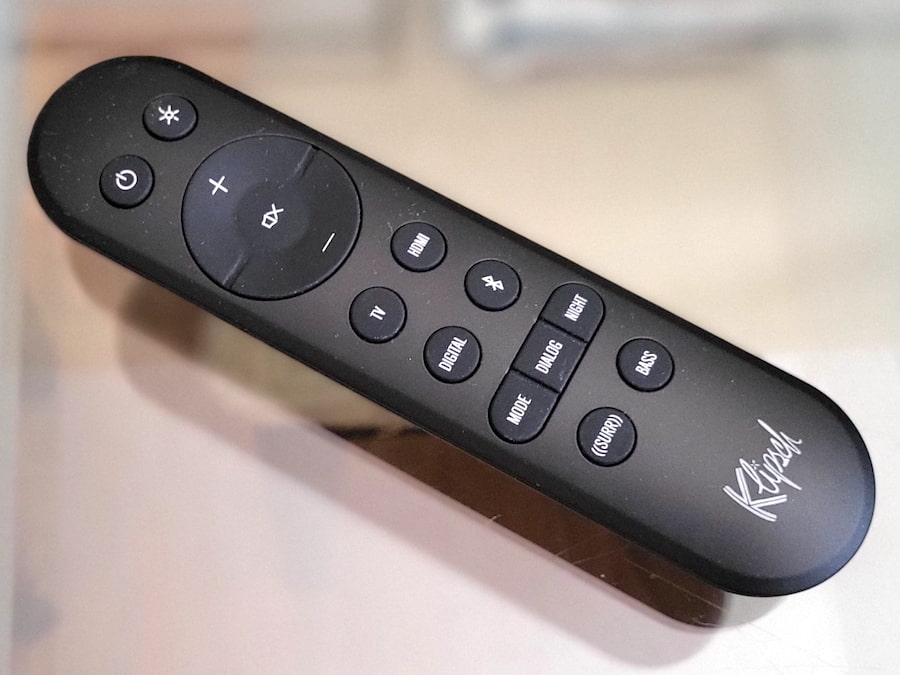
The Flexus comes with a fairly robust remote control that handles all of the essentials, including direct buttons for each input selection, volume and mute. The remote also includes access to surround modes (Movie or Music), Dialog mode and Night mode. Another nice touch is that the remote provides adjustment of the surround channel levels (side, rear and height) as well as a variable bass control. Many bars require that you dive into the app for these kinds of adjustments.
While you can get sound out of the bar without doing a full set-up, you’ll be best-served installing the Klipsch Connect app for Android and iOS. This allows you to connect the system to the internet for firmware updates, enable Google Cast, adjust options, and make direct adjustments to the levels of the various speakers from within the app. The app is also essential to perform DIRAC Live calibration using the included microphone.
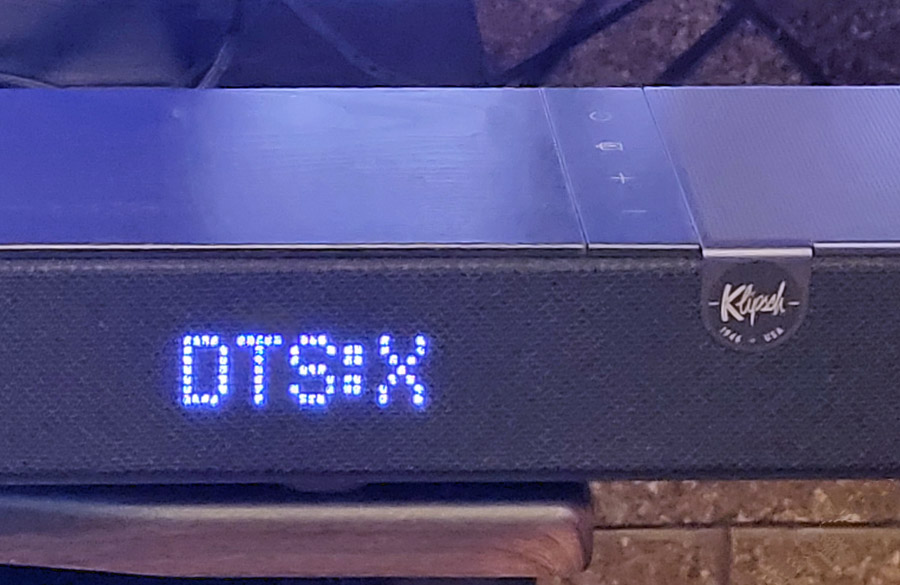
Pro Tip: If you want to see what audio format is coming into the bar, press and HOLD the LED light button on the top right of the remote control. This will display the surround format, e.g. Dolby Atmos or DTS:X on the soundbar’s LED screen.
The Set-Up
For the most part, the Flexus Core 300 is “plug and play.” If your TV has an HDMI port with ARC (Audio Return Channel) or eARC (enhanced Audio Return Channel), then this is the connection you should use. Connect an HDMI cable between the bar’s HDMI/eARC port and the TV’s HDMI/eARC port and this will get you sound from the TV, its on-board tuner, any built-in streaming apps and any devices connected to the TV. Though it should be automatic, you may need to get into your TV’s “audio output” settings menu to set the output to “external speakers” (or something similar) in order to enable the audio output over HDMI.
Once connected, we’d recommend installing the Klipsch Connect mobile app on your phone or tablet. Connect your phone or tablet to WiFi, load the app and click on the “+” button to add the Flexus Core 300 bar. The Klipsch Connect app will then walk you through the rest of the set-up. Be sure to enable “Google Cast” in the app if you intend to use that feature to cast audio from a phone, PC or tablet to the bar.
We listened to the bar on its own for a while, then added the optional Flexus SUB 200 wireless subwoofer and Flexus SURR 200 wireless speakers. Note that adding a wireless sub or wireless rear speakers requires connecting a wireless transmitter dongle to the rear USB port marked ”Transport” on the back of the bar. A dongle comes with the subwoofer and with the rear speakers.
The dongle that comes with the subwoofer is identical to the one that comes with the rear speakers, except for the pairing. If you use the dongle that came with the sub, you’ll need to manually pair the rear speakers by pressing the pairing buttons on both the speakers and the soundbar. And if you use the dongle that came with the rear speakers, then you’ll need to manually pair the subwoofer by pressing the pairing button on the sub and the bar. One dongle can support up to two wireless subwoofers and a pair of rear speakers.
After adding the rear speakers, rear channel height adjustments were automatically enabled on the remote and in the app.
I do have to mention that, after adding the rear speakers, I started hearing dropouts and other audio glitches coming from the rear right speaker. It was bad enough that I sent them back to Klipsch for a replacement pair, only to have the same problem with the new pair. Doing a bit of research, I found that the Flexus products can be subject to wireless interference from other wireless devices. Klipsch uses a proprietary low latency wireless “Transport Link” connection among its products. It transmits on the 2.4 GHz band and apparently this connection can be disrupted if your speakers are too close to a wireless router or network repeater.
After some debugging, I found the interference was not being caused by my main router, but by my TP-Link mesh network extender, which was around 5 feet from the right speaker. Fortunately I was able to move the repeater about 2 feet. And in that position it was far enough from both rear speakers not to cause any audible distortion or interference to either one.
DIRAC Live in Action
While I did do some listening before setting up DIRAC, most of my testing was done after running through the basic (bandwidth-limited) DIRAC Live correction and calibration process. Getting through it was simple, moving the included mic to three different positions while the app went through its test tone generation and measurements. The entire process took less than 15 minutes.
With the DIRAC profile applied, the biggest improvements were in bass definition and imaging precision in the lower midrange. A slight boominess in the lower bass in my listening room was pretty much eliminated by DIRAC and vocals stood out more clearly after calibration. Within the app, you can toggle back and forth, with and without DIRAC. I found the sound was pretty noticeably improved with DIRAC processing applied and didn’t notice any significant artifacts.
The limited bandwidth version only measures and corrects the speakers from 20 Hz to 500 Hz, so upper midrange and treble frequencies are unaffected by the calibration. If you’ve got a highly reflective or problematic room, you might want to invest the $99 to upgrade to the full bandwidth version of DIRAC Live.
Listening
On its own, the Klipsch Flexus Core 300 provided a huge upgrade in sound compared to the built-in speakers in our TCL QM8K TV. And those speakers are actually pretty decent as they were designed in partnership with Bang and Olufsen. Bass was more solid and extended, soundstage width and height was improved, and dialog intelligibility was dramatically improved. On Dolby Atmos and DTS:X content, sounds extended to the sides of the room, but nothing sounded like it was coming from behind me.
On clips like the intro scene from season 1 of “Andor,” rain fell gently from vaguely above and in front of me, while dialog in the nightclub was articulate and audible above the background music. On a more complicated Dolby Atmos scene like the worm attack on the spice crawler about an hour into “Dune,” the swirling sands, music and Bene Gesserit voices were a bit less coherent and distinct, though still vastly better than the sound from the TV speakers.
Moving onto Dolby Atmos music tracks like the EDM track “Alive” by KX5/deadmau5, spatiality on this track was pretty good with a wide, tall and deep soundstage but the bass drop was not super impactful. Additional Dolby Atmos music tracks, like “Rocket Man” by Elton John reinforced this opinion. Good dynamics, nice width, some height, but not truly “immersive.”
Send in the Reinforcements
Truth be told, I’ve never been that impressed with a one-piece soundbar, except maybe the $17,000 one from Steinway Lyngdorf. The cabinet of a soundbar just isn’t large enough to do deep bass, and as good as virtualization has gotten over the years, nothing can substitute for a real pair of speakers behind the listening position to create an immersive surround soundstage. So I was eager to add the SUB 200 and SURR 200 speakers to the mix. Doing so was pretty simple. Since I used the wireless dongle that came with the SURR 200 speakers, they were pre-paired with the bar, and all I had to do was plug-in the subwoofer and hit the pairing button on both the sub and the soundbar in order to establish a link.
Adding the subwoofer and rear speakers immediately expanded the soundstage to encompass the whole room with a dome of sound, and bass took on much more impact, heft and substance with the SUB 200 active. Tracks that were a bit thin-sounding, like EDM tracks from Kx5, now had power and substance. And, when the chorus kicked in in Elton John’s “Rocket Man” in Dolby Atmos. the room exploded in sound, with my listening seat at the epicenter.
Diving back into music listening, I queued up my Dolby Atmos playlist on Amazon Music, which includes the Dolby Atmos remix of Pink Floyd’s “Dark Side of the Moon.” The cash register sounds that open the song “Money” were spaced all around the room making me feel like I was inside the mix. The SURR 200 speakers were particularly effective at creating a full wall of sound behind the listening position. Integration from left rear to right rear was seamless. It literally sounded like there was a third rear speaker between the two actual ones.
Other favorite Dolby Atmos music tracks like Ed Sheeran, “Shape of You” and A-Ha “Take On Me” were reproduced on the Flexus system with great spatiality and seamless motion as voices and instruments moved around the room. And on mellower singer/songwriter tracks in Dolby Atmos like Aoife O’Donovan’s “Prodigal Daughter” and Freya Ridings’ “Lost Without You,” female vocals were presented naturally, without excessive stridency while the natural acoustics of the recording space were captured nicely.
I revisited several movies and clips in Dolby Atmos with the full system and found the rain from the opening of “Andor” was now coming from directly above my head and the cacophony of sound in the “Dune” spice crawler attack was much more coherent. In the “First Challenge” scene from “Ready Player One” on Kaleidescape, the Klipsch system did a great job representing the sheer pandemonium as Gunters and Sixers battled to find the first key. Explosions were delivered with impact and the crispy jingle jangle of coins spilled by defeated combatants came through cleanly and clearly.
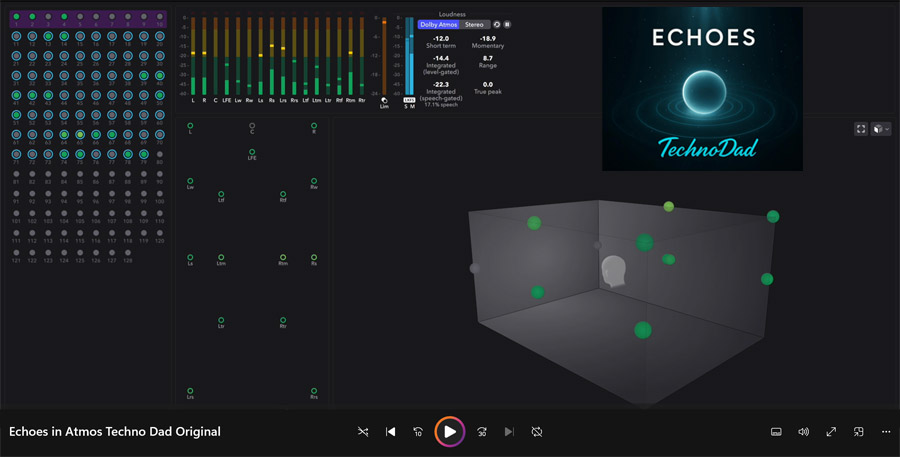
It wouldn’t be a Dolby Atmos test without some content from Channa Da Silva, a.k.a. “Technodad.” On the Flexus Core system, his original track “Echoes” made awesome use of the entire soundstage, front to back, side to side and top to bottom with percussion and synth tracks dancing all around the room. Technodad also offers a Dolby Atmos calibration toolkit, which is super helpful in setting up a home theater or surround sound system. You can check out at SpatialCD.com.
For DTS:X we put on several UHD Blu-ray Discs, including “Harry Potter and the Sorcerer’s Stone.” About 20 minutes into the film, when Harry enters the magical world of Diagon Alley with Hagrid, the soundscape expands to encompass the entire room with sounds coming from above and behind the listening position. And on “Ex Machina” (also about 20 minutes in), we’re treated to a more claustrophobic sonic experience when a power failure leads to a series of warning tones and foreboding chirps.

The 4K UHD Blu-ray of “Blues Brothers” also features a remixed/remastered DTS:X soundtrack, used to great effect during scenes like the mall chase, with destruction, broken glass and debris raining from all directions. The DTS:X soundtrack also captures the ambiance of a live performance when Cab Calloway takes the stage for his performance of “Minnie the Moocher” in a huge auditorium and the Blues Brothers themselves follow with their own performance. The space of the concert hall was captured nicely in DTS:X on the Flexus system.
A Few Words About Stereo Music
Unlike some soundbars, the Klipsch Flexus Core 300 doesn’t currently offer a pure stereo mode. Any stereo content is automatically upmixed to Dolby Surround. You can choose between “movie” and “music” modes, both of which do a pretty good job keeping the stereo soundstage intact, with some air and ambiance added. Movie mode is a bit more dynamic and punchy, while music mode is more laid back, with nice clarity of male and female vocals in the center channel.
Caveats, But Not Deal Breakers
As I noted above, initial set-up of the rear speakers required me to move my mesh network repeater around to prevent interference with the rear speakers, but eventually I was able to find a suitable spot for it. Also, when casting music from my phone via Google Cast, the connection was inconsistent. Qobuz couldn’t reliably connect to the bar via Google Cast. Amazon Music could connect via Google Cast, even passing Dolby Atmos tracks to the bar, but it would sometimes randomly lose the connection, requiring a power cycle to reconnect.
I should note that this issue was device dependent – it worked better on a Google Pixel 10 Pro phone vs. Samsung Galaxy S21FE phone. But even on the Google phone, the soundbar would occasionally lose the plot, requiring manual disconnect and reconnect of the bar from Amazon Music. If you just access a playlist and hit “play,” you’ll probably be OK, but if you start moving around between tracks or experimenting with surround modes on the bar, you may lose the connection.
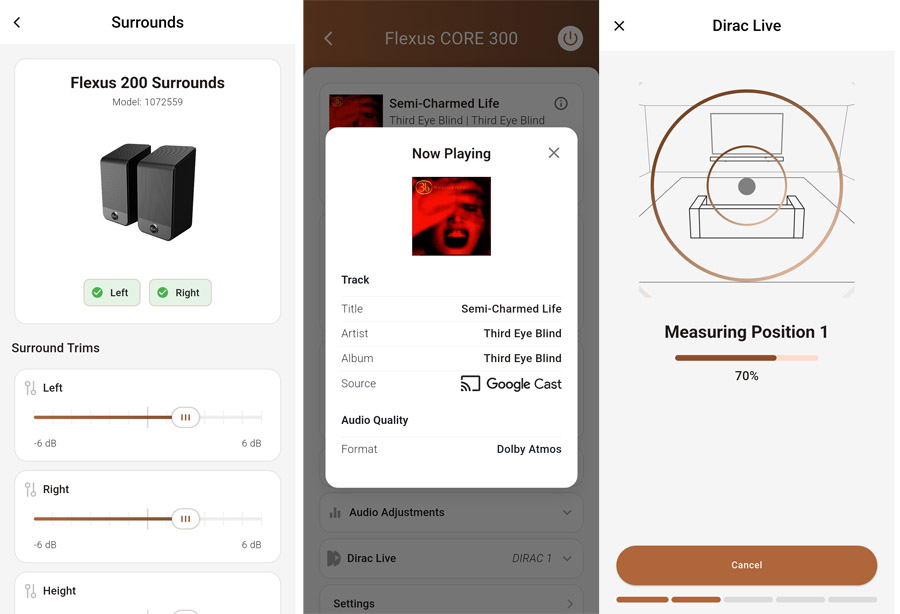
If you enjoy listening to music encoded in Dolby Atmos, you’re probably best off using a dedicated streamer like an Apple TV 4K (for Apple Music) or a Fire TV stick (for Amazon Music), either connected through the TV or directly to the Flexus Core 300’s dedicated HDMI port. This provided a much more reliable and stable listening experience. Of course, we still can’t get gapless playback for Dolby Atmos music tracks via streaming music services (which made listening to “Dark Side of the Moon” a bit annoying), but that’s not the soundbar to blame. For gapless playback on Dolby Atmos tracks, you’ll need to get your Dolby Atmos music on physical media like the amazing “Dark Side of the Moon” 50th Anniversary Dolby Atmos remix on Blu-ray Disc (which sounded particularly sweet on the Flexus Core 300 system).
Physical specifications of components included in this review:
- Flexus Core 300 soundbar: 54 x 3.07 x 4.96 inches (WxHxD) | 18.7 lbs
- Flexus Sub 200 subwoofer: 15.25 x 15.25 x 15.25 inches (WxHxD) | 36 lbs
- Flexus Surr 200 rear speakers: 4.13 x 8.75 x 4.31 inches (WxHxD) | 2.5 lbs

The Bottom Line
Despite a few hiccups in the set-up process, as well as inconsistent Google Cast performance, the Flexus Core 300 soundbar put in a strong audio performance on music and movies. While I personally wouldn’t be satisfied with the bar on its own, I found that the full system – Flexus Core 300 bar, SUB 200 subwoofer and SURR 200 rear speakers provided a dynamic, expansive, almost cinematic experience at home and was equally competent with both music and movies. While the system price tag ($2,300) isn’t exactly “cheap,” it’s actually less than comparable flagship soundbar-based systems from Sonos and Sony. And with DIRAC Live room correction and calibration thrown in, the system actually provides solid value.
Pros:
- Punchy dynamic sound for music and movies
- Second HDMI port supports direct source connection
- Can do Dolby Atmos music from Amazon Music via Google Cast
- DTS:X support worked flawlessly from Kaleidescape and Blu-ray Discs
- DIRAC Live optimizes sound for your specific room
Cons:
- Rear channels are a bit low in the mix (but can be adjusted)
- Google Cast connection was a bit unreliable
- Rear speakers were subject to wireless interference from Wi-Fi router (but fine once I moved the router)
- No analog/aux input
- No support for IMAX Enhanced, 360RA, Auro-3D
Where to buy:
- Klipsch Flexus Core 300 Soundbar – $1,199 at Amazon or Crutchfield
- Klipsch Flexus SURR 200 Surround Speakers – $499 at Amazon or Crutchfield
- Klipsch Flexus SUB 200 Subwoofer – $599 at Amazon or Crutchfield
Related Reading: