Acer announced ICONIA, a new concept device set to add a brand new tablet experience, combining the versatility of a conventional 14″ form factor with a unique dual-screen layout and highly intuitive all-point multi-touch functionality, which means you can use all the fingers of your hands to navigate ICONIA.
With its two all-point multi-touch displays Acer ICONIA offers an enhanced content consumption experience and brings the interaction with the tablet to a new level.
Multimedia, entertainment, communication, web browsing and office productivity seamlessly flow across the dual screen, allowing users to set the best scenario for what they are doing. To improve readability of web sites or documents, the window can be spread across both screens. But the dual screen also means you can do one thing in one screen and something else entirely on the other: you can browse a website on the top screen and view the contents of your favourite folder on the bottom one or you can watch a video on the top screen and check out your multimedia library in the other.
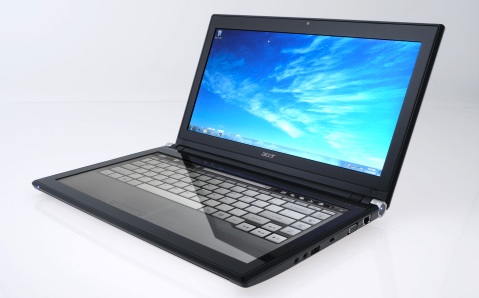
Both 14-inch displays have HD 1366×768 resolution, high-brightness Acer CineCrystal LED-backlit TFT LCDs and take advantage of cutting-edge technologies supporting all-point multi-touch for precise on-screen input. Protected by the ultra-thin yet durable Gorilla Glass, the displays are scratch and fingerprint resistant, easier to clean and offer the same touch functionality.
ICONIA is designed to provide the optimal all-point multi-touch experience on a dual-display tablet. This is why Acer equipped it with a full range of intuitive and easy to use features and applications that fully exploit the countless possibilities of multi-touch technology. The starting point to launch ICONIA's touch features and controls as well as applications is the Acer Ring.
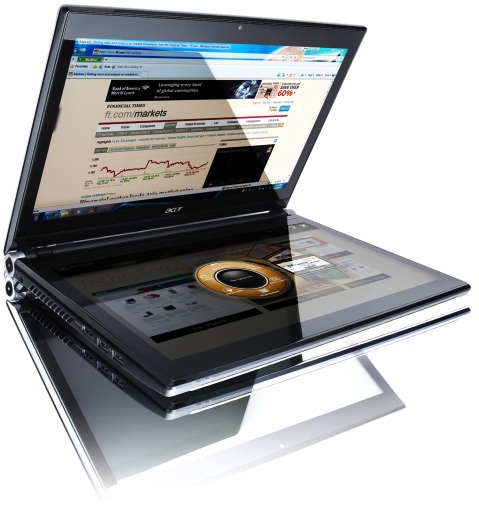
The Acer Ring appears simply by placing five fingers on the screen and making a grab gesture. The Acer Ring allows you to start touch applications by scrolling through the App cards and tapping on the one you choose. The Ring also provides fast access to: Virtual Keyboard, Gesture Editor, Window Manager, and Device Control Console.
The Virtual Keyboard can be launched from the Acer Ring or by placing both palms on the bottom display. The intelligent design senses the position of the user's palms and launches the keyboard. It comes with a full-size QWERTY layout with international language support to give users the same experience of a traditional physical keyboard and features predictive text input for natural-speed typing while avoiding mistakes. The Virtual Keyboard also includes a touchpad and a numeric keypad and can be easily switched to handwriting mode.
With the Gesture Editor you can set customized gestures to launch specific applications, open websites, view your desktop or lock your computer. The Gesture Editor offers you a simple and intuitive way to personalize ICONIA to best suit your needs.
Window Manager allows users to organize the various application windows on the double touch screen. Windows and applications can be moved across displays, so you can always have what you need where you need it. Plus, you can browse through a list of running application, and resize, dock or close windows.
A wealth of built-in touch applications designed to easily manage content provides a seamless experience. Besides those already implemented on Acer's touch devices, such as TouchBrowser, TouchPhoto, TouchMusic and TouchVideo, allowing an enhanced browsing experience with on-screen gestures to zoom, rotate, flip and scroll and to access and enjoy your multimedia from an integrated touch-optimized interface, ICONIA includes three new ones: SocialJogger, My Journal and Scrapbook.
SocialJogger lets you gather and check updates from Facebook, YouTube and Flickr in all in the same place, taking advantage of the dual screens to check posts and updates on the bottom display and use the second display for exploring and viewing more content.
You can use MyJournal to collect web clippings on your preferred topics. Web clippings are dynamically updated to display all the latest information and can be categorized and displayed according to your needs. Simply tab on a collected Web Clip to display the full webpage on the top screen for a complete access.
Scrapbook lets you easily store clippings, posts and just about anything else from different sources in the same place. You can capture screen shots from the web or an application, edit them and add notes. You can create photo collections with notes and comments. You can also add your scraps to presentations, and documents. Scrapbook helps you keep track of anything you find interesting, funny or valuable and share it!
Acer ICONIA is based on the Intel Core i5 family of processors, delivering smart performance for multimedia, social networking and other demanding mainstream applications.
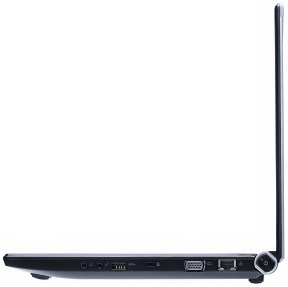
A fusion of the latest and best technology, ICONIA can also be equipped with 3G connectivity, for total freedom, while an HDMI port guarantees high-definition viewing and the Dolby Home Theater v3 provides vibrant audio for an immersive sound experience.
Price and Availability
Not announced.
Related Products
Toshiba Libretto
Dell Inspiron duo