› Search over 1.7 million forum posts on consumer electronics...
Home > Forum > Home Video > DVD Recorders > Connecting TV, Receiver, Satellite an...

Author Subject: Connecting TV, Receiver, Satellite and Toshiba Recorder
 

New member
Username: Mcmm

Post Number: 1
Registered: May-10
Posted on Wednesday, May 26, 2010 - 05:15 pm:   
I need help! I need specific instructions because I cannot get these components to work together. I have a RCA Scenium TV, a RCA RT2500 or 2500R receiver, Dish Network satellite and a Toshiba RD- XS34SU or RD-XS34SC recorder. Everything but the recorder works together. What do I need to do to get my recorder to work? Please help.
 

Silver Member
Username: Ieee488

Post Number: 356
Registered: Dec-07
Posted on Saturday, May 29, 2010 - 09:59 pm:   
How do you have everything connected now?

The Toshiba doesn't have a tuner so it needs to use the RCA receiver's tuner to be able to record.
 

New member
Username: Mcmm

Post Number: 2
Registered: May-10
Posted on Monday, June 07, 2010 - 12:43 am:   
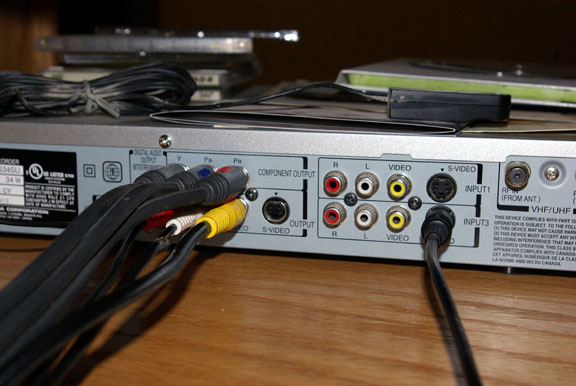
I am actually getting closer. I can see the DVD menu but still no picture. This is what I have:
I have a RCA Senium TV, RCA Receiver, Dish Network VIP 211, and my Toshiba DVD recorder.
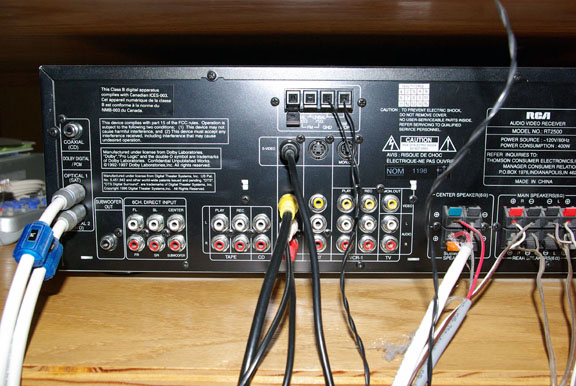
DVD connections: S Video in Input 3 goes to Receiver S Video left connection.
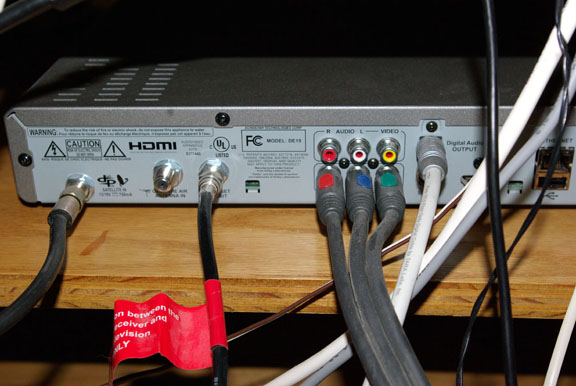
Red, Blue, Green cable - Top Component Output to TV Video Input 4 - R,B,G in Right Set
TV- R,B,G Video 3 right set to Dish Network Receiver Bottom R,B,G
Receiver- Optical 1(Sat) to Dish Network Optical Audio Output
I am attaching pictures just in case my descriptions make no sense!


Upload
Upload
Upload
 

Silver Member
Username: Ieee488

Post Number: 361
Registered: Dec-07
Posted on Monday, June 07, 2010 - 09:07 am:   
To be able to record on the Toshiba,

1.) Disconnect the cables (red,blue,green) completely.

2.) Connect one end to RCA dish receiver's Video Out jacks(red,white,yellow) and the other end to the Toshiba's Video Input 1 (red, white, yellow) jacks.
 

New member
Username: Mcmm

Post Number: 3
Registered: May-10
Posted on Monday, June 07, 2010 - 10:37 am:   
I obviously am pretty stupid because I can't get this to work.
I have tried all kinds of combinations of what I thought you were telling me to do but nothing works. Right now this is what I have.
In the middle picture I have moved the R,B,G cable to the right top set of R,W,Y Video 1 input. I also moved my S Video cable to the top Video 1.
Then I connected the other end of the R,B,G cable to my Dish Network Receiver (bottom picture) top R,B,G connections. The bottom set of R,B,G cables goes to my TV
I am somewhat confused on step #2 because it says RCA dish receiver. I have a RCA receiver and a Dish Network VIP 211 satellite receiver.
It doesn't matter whether I push the SAT, TV, VCR or Aux button on my satellite remote I can no longer see my DVD menu. I have also tried changing my TV inputs on the remote but nothing shows.
 

Silver Member
Username: Ieee488

Post Number: 362
Registered: Dec-07
Posted on Monday, June 07, 2010 - 11:44 am:   
Okay,
I think I understand better now how everything is connected.

The red+white+yellow cable in the middle photo -- is that going to the RCA receiver?
If so, move it over on the RCA receiver from DVD to the VCR1 REC.

Disregard what I told you in the previous post and connect everything up the way you have in the photos except for the one change I mention above.

Then, change TV's remote to Video 4. And change the RCA receiver's remote to VCR1.

You should be able to watch a DVD and hear the sound.

Add Your Message Here

Post: Bold text Italics Create a hyperlink Insert a clipart image Add a YouTube Video
Username: Need to Register?
Password: Forgot Password?
Options: Enable HTML code in message
Action: Upload Image
|


Site Search:


Partner Site Sections:

Buzzillions
CNET TV
NexTag
PriceGrabber
Reviewed.com
Shopper.com
Bookmark or Share This Page:


Follow Us:

FacebookRSSTwitter


Subscribe to our Monthly Newsletter?

sample
Main Site Sections:

Editorial ReviewsConsumer ReviewsNews
ArticlesVideosForumsPrice Comparisons

eCoustics, LLC - All Rights Reserved, © 1999-2011
Company Information:

About UsAdvertise With UsContact Us
FAQPrivacy Policy